Clicky
AI for Facebook Messenger

Auto-reply to every Facebook Messenger and Marketplace message

Facebook Messenger auto reply that answers every message in your voice, day and night. Review a draft, or let it send. Built for people whose customers already live in Messenger.

  • Replies in your voice
  • Works 24/7
  • Draft or auto-send
Messenger auto reply, live
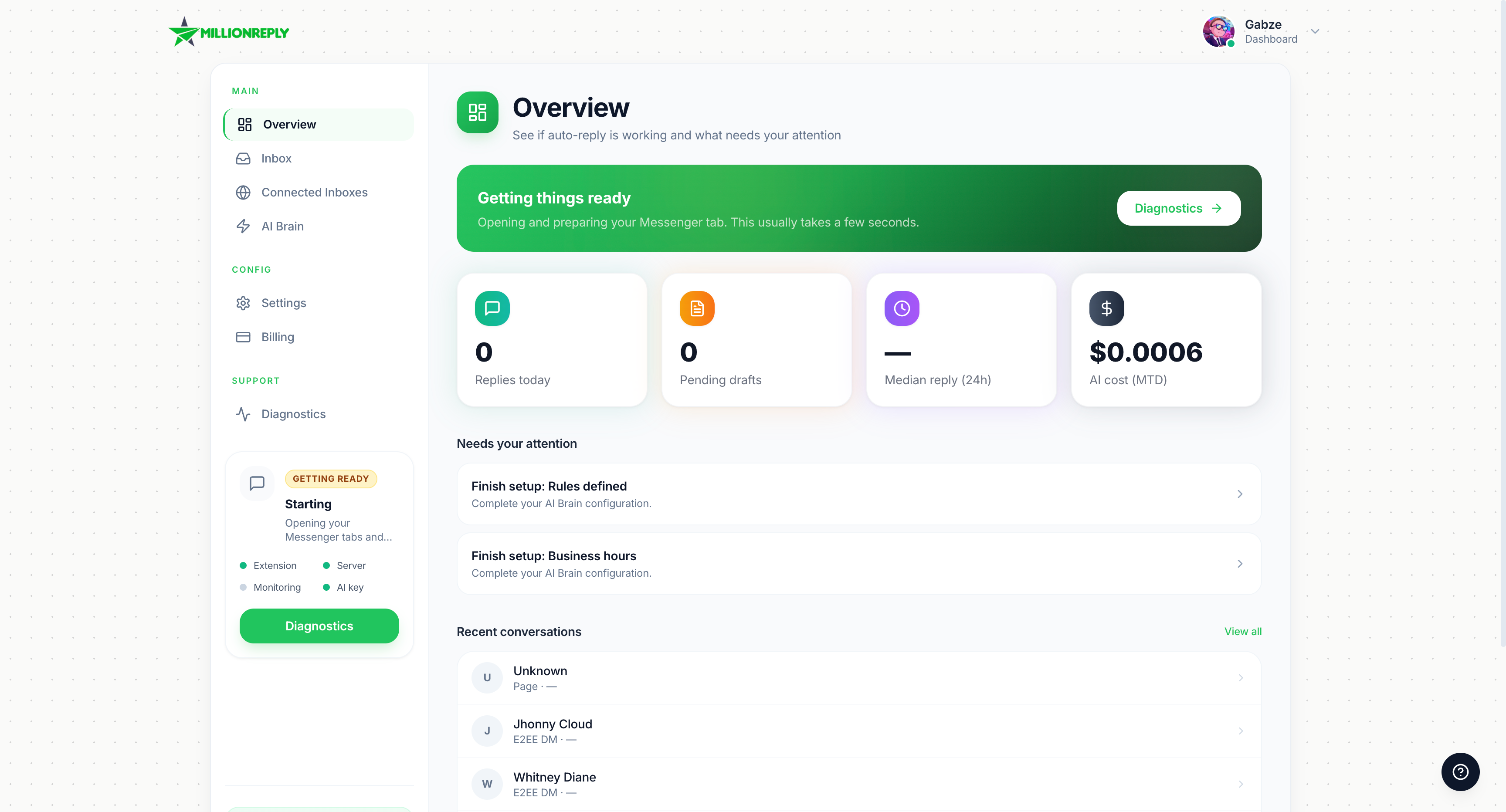
MillionReply dashboard for Facebook Messenger auto reply, with inbox, drafts, and AI reply status
24/7
Coverage
4
Reply modes
5 min
Typical setup
Your voice
On every reply

Facebook message auto reply

A slow Messenger reply is a lost customer

People message two or three businesses at once. The first clear answer usually wins. Auto reply for Facebook messages closes that gap while you are busy.

Without auto reply

Hi, are you free Thursday? What do you charge for a deep clean?

You, 3 hours later

Sorry, just saw this. Are you still looking?
  • The message sits unread while you are with a client
  • You answer three hours later with a short "sorry, just saw this"
  • They already booked someone who replied first

With MillionReply

Hi, are you free Thursday? What do you charge for a deep clean?

MillionReply, under a minute

Thursday at 10am is open. A deep clean is $180 and takes about 3 hours. Want me to hold that slot?
  • The reply goes out in under a minute, in your voice
  • Price, availability, and the next step are already in the message
  • You open Messenger to a warm lead, not a cold one

How Messenger auto reply works

Set up Facebook auto reply in about 5 minutes

01

About 2 min

Create your account and connect Facebook

Sign up, then connect Messenger from your browser. A Chrome extension handles that connection. Nothing technical to set up. About 2 minutes.

02

About 2 min

Teach it your business

Add a persona, a few facts customers ask about, and any keyword rules. This is what the AI uses on every Facebook message.

03

About 1 min

Review drafts or go live

Approve replies in the inbox, or let MillionReply send them. You can switch modes later, per inbox.

Facebook message auto reply

Facebook message auto reply for the way you actually sell

Same Messenger inbox, different businesses. Pick the closest match and see the kind of reply MillionReply sends.

Local services

Plumbers, cleaners, salons, and clinics get the same questions all day. A Messenger auto reply answers price, hours, and availability before the customer messages the next name on the list.

  • Answer "are you free today?" while you are on a job
  • Quote the usual price and the next open slot
  • Hand the chat back to you when someone is ready to book

Sample Messenger reply

Are you free Thursday morning? What do you charge?
Thursday at 10am is open. A standard visit is $120. Want me to hold that time?

Facebook inbox automation

A Messenger auto responder with a real inbox behind it

Auto reply is the front door. Contacts, tags, reports, and takeover controls are how you run it day to day.

AI Brain

Personas, knowledge, and rules live in one place. The AI for Facebook Messenger reads them before it writes, so answers match your business instead of a generic script.

Human takeover

Mark a conversation and the AI steps back. You finish the chat. It will not jump in again until you say so.

Keyword replies

Match words like price, hours, or shipping and send a reply you wrote, or switch persona.

People

Every person who messaged you after monitoring started, with the same threads you see on Home.

Tags

Color labels that follow a contact across conversations, so leads and customers stay sorted.

Business hours

Set your timezone and an optional off-hours reply for nights and weekends.

Reports

See how new Messenger conversations turn into replies, so you know the inbox is actually moving.

Blocked contacts

Blocked people stay out of the inbox. The AI will not reply to them.

Human pace

Random send delays and a daily cap keep replies from looking instant or running all day.

Health monitoring

When Facebook changes the inbox layout, we see it and update MillionReply before replies stall.

AI for Facebook Messenger

AI for Facebook Messenger, trained on your business

Personas, knowledge, rules, and business hours. Change any of them and the next reply follows.

Pick a voice. Preview updates instantly.

Live preview

Are you free Thursday?
Hey! Weekday sessions are $80. Thursday at 6pm is the next open slot. Happy to help.
Friendly Supportrule: keyword "Thursday"knowledge matched

You are in control

Four ways to run your Messenger auto responder

Auto-send, draft review, hybrid, or off. Messenger and Marketplace can each use a different mode.

Replies fire automatically after a humanize delay.

Hi! Are you taking new clients this month?
Yes, I have two openings left this month. A starter project is $900. Want the short outline?
Auto-sent · 47s humanize delay
Humanize delayDaily capFirst-touch onlySkip friends
  • Humanize delay
  • Daily cap
  • First message only
  • Skip friends

See a Messenger auto reply

A Facebook message, answered in your voice

MillionReply picks the persona, applies your rules, uses your knowledge, and sends after a short delay.

M

Messenger customer

via Facebook Messenger

Live demo
Are you free Thursday? What do you charge?

Messenger auto reply

How Facebook auto reply compares

Replying yourself works until the inbox gets ahead of you. A VA costs more and still sleeps. Most chatbots only cover a Facebook Page.

Works on personal Messenger

MillionReply
Yes
Replying yourself
Yes
Hiring a VA
Yes
Page-only chatbots
No

Replies at 3am

MillionReply
Yes
Replying yourself
No
Hiring a VA
Only if they are awake
Page-only chatbots
Yes

Sounds like you

MillionReply
Yes
Replying yourself
Yes
Hiring a VA
Sometimes
Page-only chatbots
Rarely

Knows your prices and policies

MillionReply
Yes
Replying yourself
Yes
Hiring a VA
If you train them
Page-only chatbots
Only a script

Set up in minutes

MillionReply
Yes
Replying yourself
Already set up
Hiring a VA
Days of hiring
Page-only chatbots
Often a project

You approve before sending

MillionReply
Yes, in draft mode
Replying yourself
Yes
Hiring a VA
Not by default
Page-only chatbots
Usually not

Monthly cost

MillionReply
$21
Replying yourself
Your evenings
Hiring a VA
Hundreds, plus management
Page-only chatbots
Varies, often Pages only

Safe and in control

Auto reply Facebook messages without losing the conversation

You decide which chats run, how fast replies go out, and when a human should take over.

Only chats you turn on

Automation runs on the inboxes and threads you enable. Everything else stays manual.

Pause anytime

Stop all replies from the dashboard, or pause a single conversation without touching the rest.

Human takeover

Mark a thread and the AI backs off so you can finish the conversation yourself.

Blocked contacts

Blocked people are hidden from the inbox. MillionReply will not reply to them.

A human pace

Replies wait a short random delay and stop at your daily cap, so they do not fire in a burst.

Your data, your call

Message history stays in your MillionReply account. Retention and deletion are covered in the Privacy Policy.

Read the Privacy Policy

Pricing

One plan for Facebook Messenger auto reply

Full product, $21 a month. Cancel anytime. Money-back guarantee on your first paid charge.

One simple plan

MillionReply

$21/mo
  • Facebook Messenger auto reply
  • AI Brain: personas, knowledge, rules, hours
  • Draft, auto, hybrid, and off
  • People, tags, and reports
  • Human takeover and blocked contacts
  • Marketplace messages included
Get started

Cancel anytime. Money-back guarantee.

Also included

  • Money-back guarantee
  • Cancel anytime from billing
  • Separate reply settings per inbox
  • Business hours and off-hours replies
  • Daily caps and send delays

Facebook Messenger auto reply

Facebook Messenger auto reply, explained

If you have searched for a Messenger auto responder or a way to auto reply to Facebook messages, this is the short version of how MillionReply does it.

What is a Messenger auto reply?

A Facebook Messenger auto reply is a message sent for you when someone DMs your personal inbox. MillionReply writes that reply from your voice, your prices, and your rules, then either sends it or saves it as a draft.

How AI auto reply for Facebook messages works

A new Facebook message comes in. MillionReply checks your persona, knowledge, keyword rules, and business hours, then writes a reply. Auto mode sends it after a short delay. Draft mode waits for you to approve it in the inbox.

Auto reply vs an AI chatbot for Messenger

A basic chatbot repeats one saved line. An AI chatbot for Messenger can answer the actual question, but only if it knows your business. MillionReply is that chatbot plus an inbox: people, tags, reports, pause, and human takeover.

Setting up Facebook auto reply

Create an account, connect Facebook, and add a few facts customers ask about. Pick draft, auto, or hybrid. Most people finish Facebook message auto reply setup in about 5 minutes and can change any of it later.

FAQ

Facebook Messenger auto reply questions

How do I set up an auto reply on Facebook Messenger?
Create your account, connect Facebook, and add how you talk plus a few facts about your business. Pick draft, auto, or hybrid. Most people are answering Messenger conversations in about 5 minutes.
Can AI reply to my Facebook messages automatically?
Yes. Auto mode sends the reply after a short delay. Draft mode writes it and waits for your approval. Hybrid sends the first reply and asks you to approve follow-ups.
Does this work for personal Messenger or only Pages?
Personal Facebook Messenger is supported today, including the conversations you already have. Facebook Pages and Instagram are coming soon.
Can I review replies before they send?
Yes. Set Draft mode and approve every reply from the inbox before it goes out.
Will Messenger auto replies sound like a bot?
You set the voice, the facts, and the rules. Replies use that material, then wait a short random delay so they do not send the instant a message arrives.
Can I pause Facebook message auto reply?
Yes. Pause everything from the dashboard, or pause one conversation. Human takeover hands that thread back to you.
Does it work with Marketplace messages?
Yes. Facebook Marketplace auto reply is included as a second inbox with its own settings. Messenger is the main workflow.
What is an AI chatbot for Messenger, and is this one?
An AI chatbot for Messenger answers questions in a conversation instead of sending one saved line. MillionReply does that, and it also gives you an inbox, contacts, tags, reports, and a way to take any chat back.
How does billing work?
One plan at $21 a month. Cancel anytime from the billing page. There is a money-back guarantee on your first paid charge. See the refund policy for the exact window.
Which AI writes the replies?
AI reply generation is included with MillionReply. Advanced users can optionally connect their own OpenAI or Anthropic key.
What if Facebook changes the inbox?
MillionReply watches for inbox changes. When Facebook moves the layout, our team updates the product so replies keep working.
What happens after I sign up?
You connect Facebook, set your voice and a few business facts, choose a reply mode, and start with the conversations already waiting in Messenger.

Start answering Facebook messages today.

Connect Messenger, set your voice, and let the next customer get a real reply instead of silence.

Get started

Set up in about 5 minutes. Cancel anytime.