How to set up auto reply on Facebook Messenger
Facebook Messenger auto reply is a short setup if you already know your prices, hours, and which chats should stay manual. The switch is the easy part.
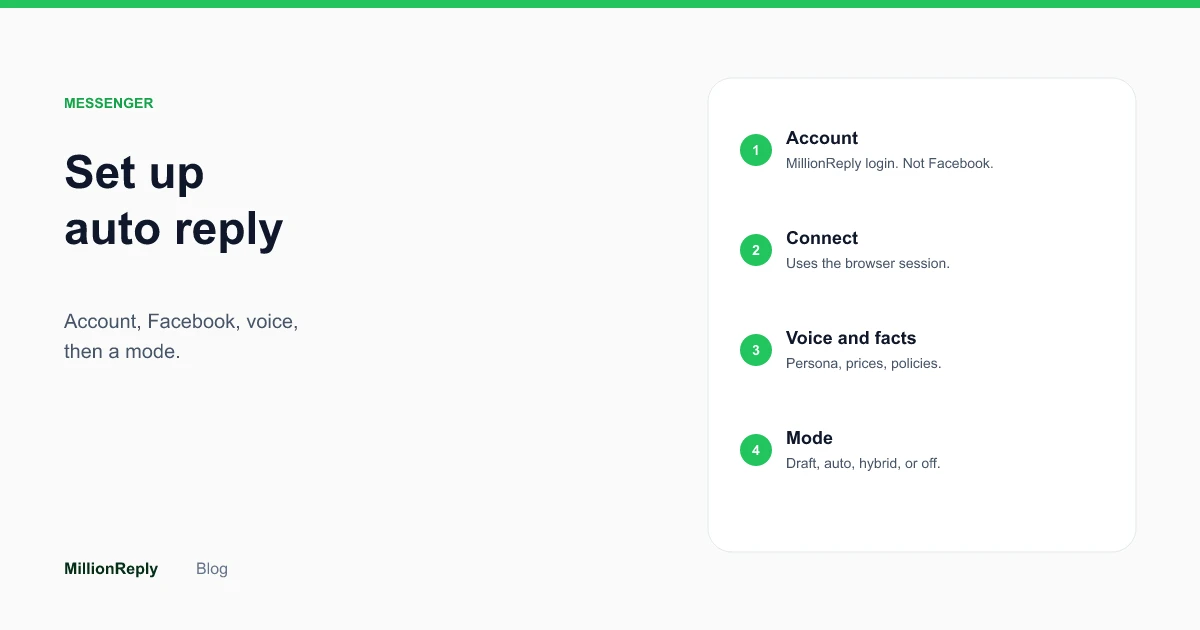
Facebook Messenger auto reply means a new message can get a reply in your voice without you typing it in that moment. You connect Facebook in Chrome, store how you talk and a few business facts, choose whether the reply waits for you, and leave a Messenger window open so new messages can be seen.
If you only have ten minutes, spend seven of them on the facts. The account and the connection are the short part.
What Facebook Messenger auto reply actually means
People use “auto reply” for three different things, and they fail in different ways.
A saved reply is a line you wrote once. You still find the chat, paste the line, and hit send. It is fast if every message is identical. It is useless the moment someone asks a second question.
A Page chatbot is a script attached to a Facebook Page. It can run when you are asleep, and it usually sounds like a script. It also does not live in your personal Messenger chats. If customers message you, the person, a Page bot never sees them.
An AI inbox reads the message, uses a voice you set and facts you stored, and either drafts a reply or sends one. That is the version this guide is about. MillionReply does that for personal Messenger, with Marketplace as a second inbox you can configure on its own. The features page lists the pieces: personas, knowledge, rules, business hours, and four reply modes.
Auto reply is not a promise that every conversation is finished. A good setup answers the first useful question and gets out of the way when the chat needs a person.
What you need before you open the dashboard
Write these down before you create the account. Doing it inside the form makes people rush.
- The words you actually use when someone asks the price.
- Hours, and what “closed” should say.
- Pickup, delivery, or service area, if that is how you work.
- One or two questions you refuse to answer without looking. Custom quotes, complaints, and “can you make an exception” belong on that list.
- Which relationships should never get an automated reply. Friends are the usual example. There is a skip-friends control for that.
An example, labeled as an example: a tutor who books lessons over Messenger might write “Weeknight lessons are 6pm to 8pm. Saturday morning is 9am to 12pm. A single lesson is $40. I do not hold a slot without a reply confirming the time.” That paragraph is more useful than a tone slider.
If you sell on Marketplace as well as chatting in Messenger, keep a second note for listing questions. “Is this still available?” is a different job from “Can you come Thursday?” The Marketplace guide covers that inbox on its own: Facebook Marketplace auto reply.
Create the account and connect Facebook
Create a MillionReply account with your email. That password is for MillionReply. It is not your Facebook password, and the product does not ask for the Facebook password.
Install the Chrome extension and stay logged into Facebook in that same browser. The extension uses the session already there. If Facebook is logged out, connect Facebook after you log in. Do not type Facebook credentials into MillionReply.
Onboarding then asks you to connect Facebook and confirm the inbox. Personal Messenger is the main one. Marketplace can be included as its own source, with its own reply settings. Turn on the inbox you are ready to answer. Leave the other off until the facts for that inbox exist.
After monitoring starts, MillionReply opens a Messenger window to watch for new messages. Leave that window open, and stay logged in. Closing it stops the watch. Messages that were already in the inbox before monitoring started are left alone. The reply engine works on messages that arrive after that point.
Most people who already know their facts finish this in about five minutes. If you are inventing your refund policy while you type it, you are not in the five-minute path, and you should not turn on auto send yet.
Teach it your voice, then teach it the facts
Voice and facts are different settings. Mixing them up is how replies become polite and wrong.
A persona is the voice: tone, language, and an optional signature. Tones in the product are casual, professional, and fun. Pick the one closest to how you already type. Language is the language you answer in. A signature is optional. Use one if you want a name and a business on the reply. Skip it if you never sign Messenger messages. A signature on a chat that never had one is a small tell.
Knowledge is the facts. Prices, hours, what you sell, what you do not do. The reply should pull from that when someone asks a real question. If the fact is missing, a confident reply will invent a nearby fact. That is the failure mode to design against. The longer guide is here: what to teach an AI before it answers.
Rules sit beside knowledge. You can match a keyword, a pattern, or an intent, in an order you set. Use a rule when a question must get one exact line. “What is your weekend rate?” can be a rule if the rate never changes. A rule is a bad place for a conversation.
Business hours are a schedule in a timezone, plus an optional reply for messages that arrive outside that schedule. If you answer at all hours, you can skip this. If you do not, write the closed reply before you test anything at night. There is a separate note on that: what to send after hours.
How the voice should read, including the phrases that make a message feel canned, is covered in how to make Facebook auto replies sound like you.
Pick a reply mode before you go live
There are four modes. Messenger and Marketplace can each use a different one.
Draft writes the reply and waits. You approve it in the inbox, then it sends. This is the right first week for almost everyone. You learn what the drafts get wrong while nothing has gone out.
Auto sends after a short random delay. The delay is there so the reply does not fire the instant a message arrives. A daily cap stops the day from turning into a burst of sends. Auto is reasonable when the questions repeat and the facts are written. It is a poor fit for quotes, complaints, and anything you have not stored.
Hybrid sends the first reply and holds follow-ups as drafts. The first touch is usually “are you open” or “is this available.” The second message is where the conversation gets specific. Hybrid matches that shape.
Off means the inbox stays manual. Use it for a source you connected but do not want answered yet.
The mode guide goes through the choice with more cases: draft, auto, or hybrid.
Two other controls belong in the same pass. First message only, if you want the AI to stop after the opening reply. Skip friends, if personal chats with people you know should never be answered by the product. Both exist so the inbox does not treat every thread as a lead.
Turn on only the chats you want
Automation runs on the inboxes and threads you enable. Everything else stays manual. That sentence is the whole safety model, and it is easy to skip because the dashboard will let you enable more.
Start with one source. If you live in personal Messenger, leave Marketplace off for the first day even if you sell there. If Marketplace is the painful inbox, do the reverse. A second inbox doubles the ways a reply can be wrong.
You can pause everything from the dashboard, or pause one conversation. Human takeover marks a thread so you finish it and the AI stays out until you hand it back. Blocked contacts are hidden from the inbox and do not get an AI reply.
If a thread feels sensitive halfway through, take it over. Do not wait to “see what it says.” Draft mode makes that easier, because nothing sends until you do.
What to check on the first day
Read the first drafts out loud. If you would not send the sentence, the fix is usually a missing fact, not a different tone.
Check three things before you consider the setup finished:
- A normal question you get every week produces a reply that matches your note. Price, hours, or availability.
- A question you refused to automate does not get a confident answer. If it does, add the fact or take those threads by hand.
- Pause works. Pause one thread, confirm nothing further goes out on it, then resume only if you want the AI back.
Then look at the Messenger window. If it is closed, monitoring is not watching. If Facebook logged you out, log in again in Chrome. The extension does not keep a separate Facebook login for you.
Reports show which new chats turned into replies. Use them at the end of the day. You are looking for surprises, not a score.
An example of the first evening
This is an example, not a customer story. A plumber gets Messenger notes all day: “Are you free Thursday,” “Do you cover the north side,” “What do you charge to look at a leak.” He has been answering from the van, usually an hour late, often with the same three sentences.
Before he creates the account he writes this note:
“Call-out in the north side of town is $80, waived if we do the repair. I do not quote a repair price from a photo. Thursday and Friday this week are full. I can look at Monday. I do not work Sundays.”
He sets the tone to casual, because that is how he types. He does not add a signature. He never signs chats. He sets draft mode, a daily cap he could actually read, and skip friends, because his brother messages him on the same account.
The first draft that evening answers “are you free Thursday” with Thursday being full and Monday open. That matches the note. The second draft tries to estimate a repair from a blurry photo. He did not want that. He adds one line to knowledge: “If someone asks what a repair will cost, say you need to see it and do not give a number.” The next draft stops at the visit.
He leaves it on draft for two days. The drafts start to look like the messages he was already sending from the van. Then he switches weekday Messenger to hybrid, so the first “are you free” can go out, and anything about price waits. Marketplace stays off, because he does not sell fittings there. That is a finished setup. It is not a clever one.
Mistakes that make the first week noisy
Turning auto on before you have read a draft. The mode is a send policy. It does not check whether your notes are finished. Draft is how you find the missing sentence.
Writing a persona and calling it knowledge. “Be helpful and friendly” does not contain a price. The model will still answer the price question. It will answer with a tone you like and a number you did not choose.
Connecting both inboxes on day one. Messenger questions and Marketplace questions look similar and are not. Availability on a listing is a yes or no. Availability for a job is a calendar. One persona can serve both. The facts and the mode should not be copied without reading them again.
Closing the Messenger window and assuming the extension remembers Facebook on its own. It uses the open session. If the window is closed, or Facebook has logged you out, new messages are not being watched. Check that before you blame the wording.
Replying to old threads by hand and expecting the product to join halfway. Monitoring answers messages that arrive after it starts. Scroll back and answer history yourself. Mixing the two makes it look like the tool ignored people, when those chats were never in scope.
Setting no daily cap because you “do not get that many messages.” Caps are for the day the post does well, or the day a listing is shared. A cap is a ceiling, not a goal. You can raise it after a quiet week.
What you can change later
You do not rebuild the account to change your mind.
The mode can move from draft to hybrid to auto, or back, per inbox. If a week of auto replies includes one bad send, go back to draft for that inbox. The facts stay.
Knowledge can be edited when a price changes. Do that before you announce the price in a story or a listing, not after the first wrong reply. Rules that hard-code an old number need the same edit. A rule will keep saying the old number with complete confidence, because that is what a rule is for.
You can pause a single thread when a job becomes a real conversation, and leave the rest running. You can pause everything if you are in the middle of a job and do not want any sends. Resume when you are back.
Friends, blocked contacts, and chats you never enabled do not need a new setup to stay manual. Leave them out.
Page inbox and Instagram are not part of this setup. If someone asks you to “just connect the Page too,” the honest answer is that those inboxes are not available yet. Personal Messenger and Marketplace are the product today.
Where Facebook’s own tools stop
Facebook lets you save a reply and paste it. That is useful for one sentence you send every day, and you can keep doing it for the chats you left on manual. It does not know which question was asked, it does not wait for approval as a policy, and it does not run while you are under a house.
Facebook also offers automated greetings and away messages on Pages. Those are Page tools. They do not answer the personal Messenger thread where your regulars already write. If your customers message you, setting up a Page bot does not solve the inbox you actually have. The difference is spelled out in personal Messenger versus a Page auto reply.
Use the saved reply for the one line you want frozen. Use knowledge and a mode for everything that depends on what the person asked.
A plain sequence you can follow
- Write the facts and the questions you will not answer.
- Create the MillionReply account and install the extension in Chrome.
- Log into Facebook in that browser and connect it. Confirm the Messenger inbox.
- Add a persona that matches how you type. Add knowledge from the notes. Add one rule only if a line must be exact.
- Set the mode to draft. Set a daily cap you would be comfortable hitting.
- Start monitoring and leave the Messenger window open.
- Read real drafts. Fix the facts. Move to hybrid or auto only after the drafts look like messages you would send.
That is the setup. The product can be running in a few minutes. The replies are only as safe as the notes you gave them.
If you want the same path inside the product, the features page walks through personas, knowledge, and modes without the setup story.
Questions people ask
How long does Messenger auto reply take to set up?
Does setup need my Facebook password?
Can I set up auto reply and still approve messages?
Will it reply to old Messenger chats?
Does this set up a Facebook Page inbox too?
Keep reading
- Draft, auto, or hybrid for Facebook messages Use draft when a wrong reply is expensive, hybrid when only the first message repeats, and auto after the drafts already sound like you.
- How to make Facebook auto replies sound like you Set a tone you already use, store the facts separately, and cut the filler. Read ten drafts before you let any reply send on its own.
- What to teach an AI before it answers Facebook messages Store prices, hours, availability, and the questions you will answer yourself. A reply can only be as true as the note you gave it.
- Facebook Marketplace auto reply for "is this still available?" Answer availability, price, and pickup from facts you stored. Keep Marketplace on its own reply mode, and do not let a draft invent a discount.